您好,欢迎访问这里是富兴智能SMT设备自动化官网!
Customer Service Hotline
18565526634
您好,欢迎访问这里是富兴智能SMT设备自动化官网!
18565526634
联系人:杨先生
Mobile:18565526634
Tel:18565526634
邮 箱:1404870852@qq.com
Address:广东省深圳市宝安区松岗街道松裕路 142 号
Components not showing proper leads after insertion is a common assembly problem. Causes and fixes:
1. Bent or damaged leads. Leads bent during transport, storage or handling insert incorrectly. Inspect components before use; straighten bent leads carefully with proper tools.
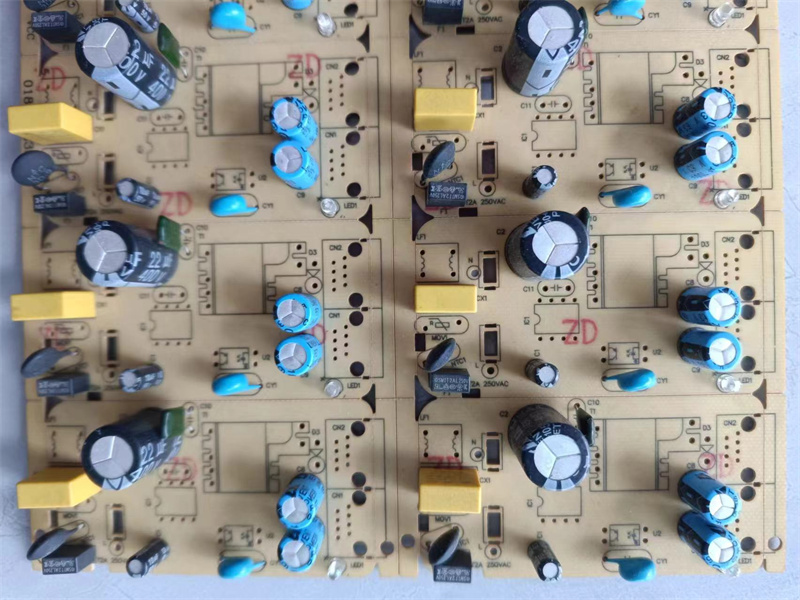
2. Incorrect machine settings. Wrong insertion depth or cut length settings produce leads that are too short or hidden. Re-verify program parameters against the component specification.
3. Worn tooling. Cutting and forming blades wear over time — a worn blade cannot cut or bend cleanly. Follow the blade replacement schedule.
4. Board or fixture problems. Warped boards or worn fixtures change the board-to-head distance, altering insertion geometry. Check flatness and fixture condition.
Systematic diagnosis: change one variable at a time and test — most cases trace back to settings or tooling within minutes.
Contact Fulxing Intelligent for a free consultation and quotation: Tel/WhatsApp +86 18565526634.
Was this article helpful??
: ./template/plugins/zan/pc/index.htm

Copyright © 2002-2024 深圳富兴智能装备有限公司 版权所有 ICP License:
Service Hotline